Shipping & freight
Shipping & freight
What it is
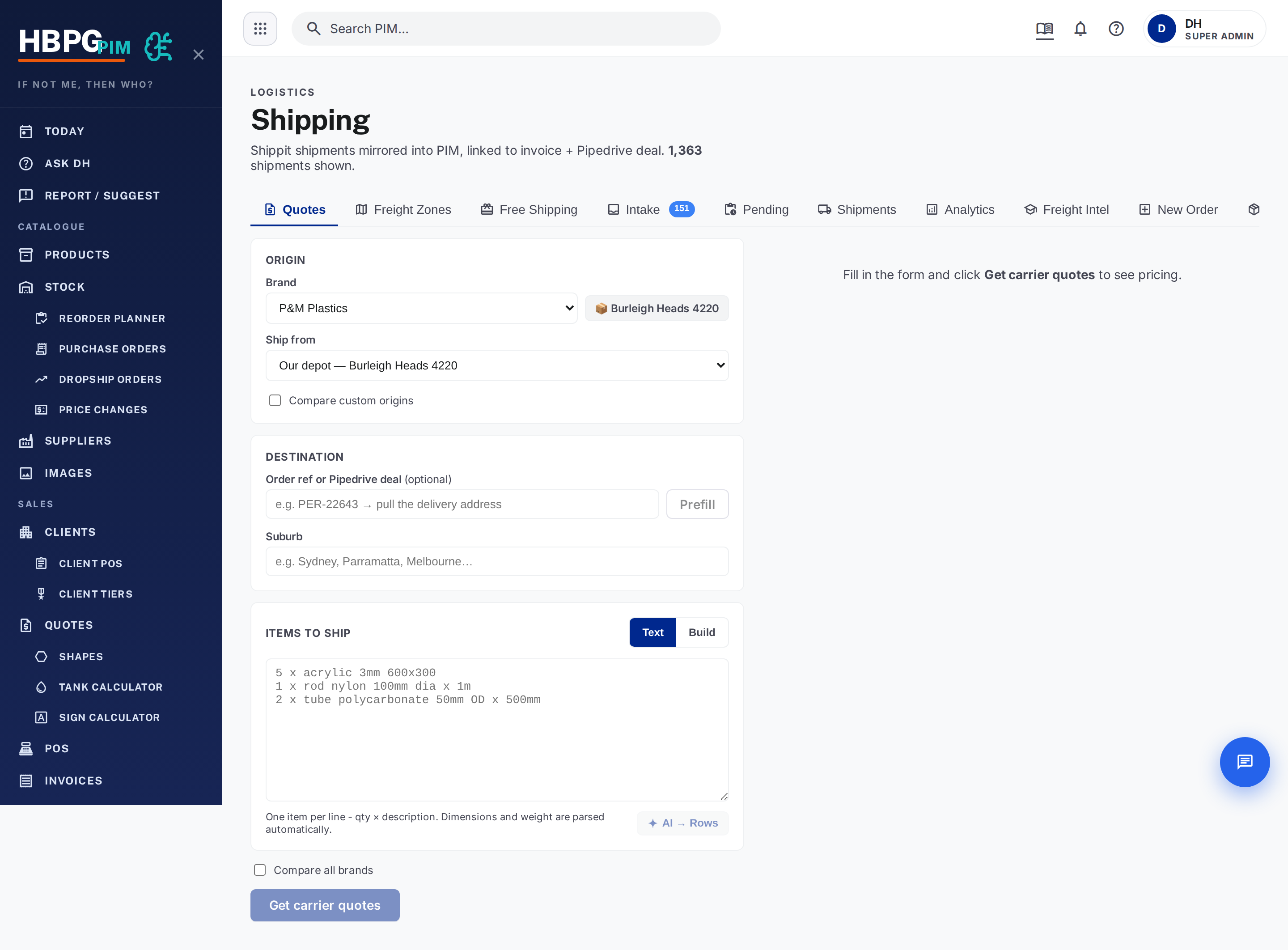
Freight is handled by the shipping calculator (shipping.hbplastics.com.au).
It gets live quotes from multiple carriers (via Shippit, plus a direct Team
Global Express option), works out how the order packs into parcels, flags
pallets / oversize items, and can book the consignment.
flowchart LR
  A[Enter suburb + items] --> B[Pack into parcels]
  B --> C[Quote every carrier → cheapest marked]
  C --> D[Choose a rate]
  D --> E[Book consignment → tracking number]
How to quote and book freight
- Enter the destination — start typing the suburb/postcode (autocomplete).
- Confirm the items/dimensions. If the auto-read is off, enter the items by hand (description, material, dimensions, weight, quantity) for an exact quote.
- Get the quote — you’ll get a list of carrier rates with the cheapest marked.
- Choose a rate (usually the cheapest; you can pick another).
- Book the consignment — this creates the order with the carrier and returns a tracking number.
Staff see this on the cart/checkout (customer-facing), in the PIM (with the pallet/oversize flags and cost/sell/margin), and freight fields show on the Pipedrive deal.
The flags that matter
The system flags a package as:
- Pallet — heavy or big (over ~30kg, or very long/wide/bulky). Parcel couriers are dropped and the price is clamped to a sensible band, because carriers otherwise return nonsense (one real 215kg pallet came back anywhere from $24 to $3,512 — the true rate was ~$170).
- Oversize — a long but light item (like a 1.8–2.4m acrylic tube under 30kg) that would sneak a cheap parcel rate a courier then surcharges or refuses. The long-item trigger is 1800mm.
On an oversize flag in the PIM, decide whether to add a manual surcharge — the customer-facing rate stays as-is until you do.
What happens when you click Book
When you click Book on the PIM Shipping tab, two things happen in sequence:
- Order created in Shippit — the consignment is registered with dimensions, weight, and recipient address.
- Book step — Shippit allocates a courier, generates a label, and moves the order to “Ready to Ship”.
Shippit’s courier allocation is async — step 2 sometimes isn’t ready immediately. When that happens:
- You’ll see a “booking in progress…” badge on the shipment detail.
- The system automatically retries every 3 minutes (up to 50 orders per cycle). Most bookings complete within one or two cycles.
- If it’s still stuck, the detail shows “attempt N” with a tooltip showing the last error — this helps Daniel diagnose carrier-side issues.
- You don’t need to click Book again — it will complete on its own. But you can if you want to retry immediately.
Once booked, the system auto-manifests (dispatches the pickup) for Perspex and P&M accounts. Other accounts need a manual End of Day.
Cancelling a booked shipment
Cancelling a booked shipment doesn’t delete it — it un-books the order (voids it in Shippit) and returns it to the Intake tab as “pending quote” so you can re-book it with a different carrier or address.
Cancelling an unbooked intake row (never sent to Shippit) removes it from the queue permanently.
If the shipping calculator is down
If the quote service is unavailable, the order still goes through and an operator hand-quotes the freight afterwards. Don’t hold up a sale waiting on shipping.
Gotchas
- Carrier prices are GST-inclusive — don’t mix ex-GST and inc-GST when comparing or margining.
- Long light items are the classic trap — trust the oversize flag over a suspiciously cheap parcel rate.
Common questions
- The quote looks way too cheap for a big/long item. Check the pallet/ oversize flag — the parcel rate is probably wrong; use the floored/clamped price or hand-quote.
- No quote came back. The service may be down — proceed and hand-quote (see above).
- I booked but it says “booking in progress”. Normal — Shippit is still allocating a courier. It will complete within a few minutes automatically.
- The label button says “Not Found”. The label only exists after the book step completes. If it shows “booking in progress”, wait for that to finish.
- I cancelled a booked order but it didn’t come back to Intake. It should now — this was fixed (July 2026). If it still doesn’t appear, refresh the page.
Who to tell if it breaks
Tell Daniel or flag in #whats-new.
Derived from: the shipping-calculator worker, NOTES, product-master-worker shipping-ops, and PIM dashboard Shipping page. If this looks wrong, the source changed — update the source and re-generate, don’t just patch this page.